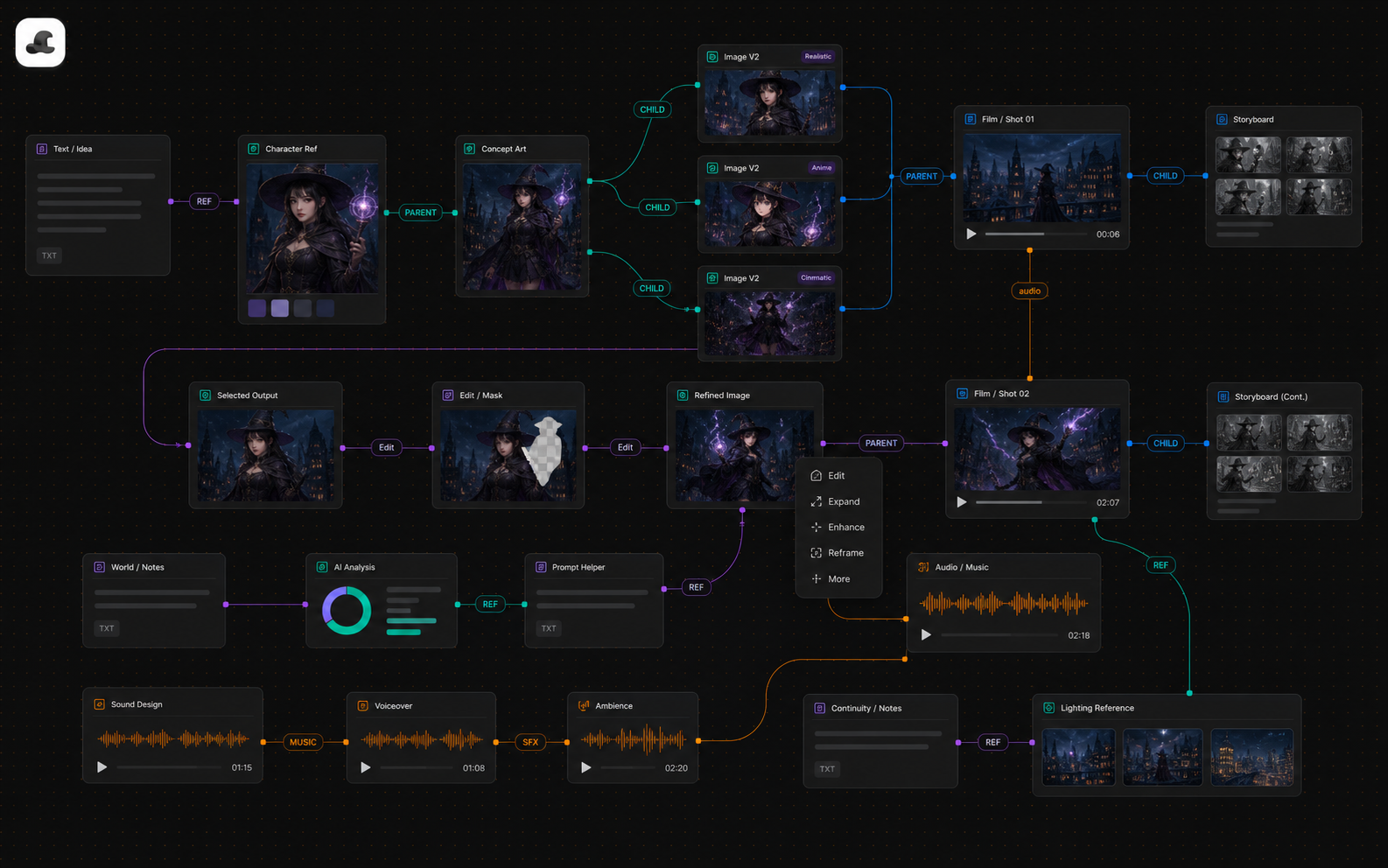
The chat window's problem isn't capability — it's shape: context is arranged as a timeline, but creative work is organized by relationships. A canvas turns "this image referenced that image, used this prompt, feeds that shot" into visible connections; failed generations stay on the canvas as negative samples; one shared set of reference assets can feed multiple models with completely different prompt habits. Explore on the free canvas; switch to a structured workflow for batch production.
Why the Chat Window Breaks Down by Day Three
One-shot generation in a chat window is perfectly fine — the trouble starts when a project enters its third day, and it all comes from the same root cause: a conversation is a timeline; creative work is a web of relationships.
- Assets go missing. "That profile shot from last week with the great lighting" lives 28 turns up from turn 40. You either scroll, or regenerate something "close enough" — and now your character has two slightly different profiles.
- Version relationships get lost. A keeper image is usually the product of seven or eight iterations, but the chat log keeps only a linear ledger: which change was the decisive one, which branch got abandoned, why — all left to memory.
- Switching models means moving house. Want to feed a Nano Banana character image into Seedance for video? Re-upload, re-describe the context. Every model switch resets your project context to zero.
Three Working Methods That Actually Matter on a Canvas
1. Make reference relationships explicit. In CanvasMAX, "this shot used this character sheet and this location image" is a REF link drawn on the canvas, not a sentence buried in a prompt. Come back to revise the shot three weeks later and its inputs are obvious at a glance. Chaining (one step's output is the next step's input) and fanning out (one input, several directions tried in parallel) work the same way — the lineage of your generations is directly visible.
2. Don't delete failed generations. Counterintuitive but valuable: results that went sideways are worth far more parked in a corner of the canvas than deleted. They answer the question "how does this model interpret this kind of prompt" — and scanning the failure pile before your fifth attempt is cheaper than stepping in the same hole again. A chat window can't do this, because failures and successes are crammed onto the same timeline, and deleting is the only way to cut the noise.
3. One asset set, many dialects. Different models want completely different phrasing: Nano Banana's official guide explicitly rejects keyword-stuffing and wants full narrative sentences; the Midjourney family eats tag streams; Seedance and Kling are Chinese-native, while Veo and Midjourney are noticeably steadier in English. No single prompt fits them all — but your reference images and character designs can be shared. That's the canvas's core value: it separates the assets from each model's way of saying it. Switch models, keep the assets, rewrite only the wording.
When to Leave the Canvas and Enter a Workflow
The canvas is for exploring, not for batching. The signal is concrete: the fourth time you catch yourself rebuilding the same wiring pattern on the canvas (character image + location image → storyboard → video), it's time to freeze that pattern into a pipeline. The division of labor in MajoFlow: CanvasMAX owns the "I don't know what I want yet" phase; the orchestration canvas owns the "I know what I want, and I need thirty of them" phase — script, assets, storyboard, shots, and video advance step by step, with canvas-proven assets referenced directly by the pipeline. And it flows back the other way: when a shot in production just won't come together, drag it back onto the canvas, work it out slowly, and return it to the pipeline once it clicks.
FAQ
I'm used to the chat window. When do I actually need a canvas?
Not for one-shot images. Switch when you see these three signals: you're scrolling history to find assets, you're re-describing the same character over and over, or you want to feed one model's output into another. All three mean your relationships have outgrown the timeline.
Won't keeping failed generations just pile up into a mess?
Mark off a dedicated failure zone so it never mixes with your main line. Its value is the thirty-second review before you generate: how did this model misread me last time? Periodically clear out the ones with no information and keep the representative traps.
Do prompts really not transfer between models?
The core information (subject, action, composition) transfers; the phrasing doesn't. Narrative sentences fed to Midjourney dilute the weighting; tag streams fed to Nano Banana violate its official guide. Shared assets plus per-model rewording is the practical answer to multi-model collaboration.
Is MajoFlow a model aggregator?
No. An aggregator solves "use many models on one page"; MajoFlow solves "many models serving one piece of work" — the difference is everything this article covers: the asset layer, explicit reference relationships, and the switch from exploration to production.
Keep Reading
How to Build an AI Short Film, Animation, and Video Workflow