Break the film into shots: one complete action per 5-second generation, never more than two per 10 seconds. Write prompts in the order "subject (attributes explicitly bound) → action → camera move → lighting and mood," and rewrite every "no X" as a positive alternative. Put dialogue in quotation marks for the model to voice, and make its length match the shot duration. Character consistency comes from multi-angle character sheets and verbatim-repeated character descriptions — not from luck.
Think in Shots First, Film Second
The most common beginner failure is cramming thirty seconds of story into one ten-second prompt: the character has to stand up, walk to the window, pull back the curtains, turn around, and deliver a line — and the model executes one or two of those vaguely while the rest dissolves into glitchy nonsense. Video models hold far less than most people expect:
- 5 seconds ≈ 1 complete action; 10 seconds ≈ 2 consecutive actions. That's the ceiling Seedance's official guide states outright, and our testing puts other models in the same range. Overloaded actions don't get "compressed" — they get randomly dropped.
- One camera move per shot. Stacked instructions like "dolly in while orbiting, then tilt up" are the number-one source of unstable footage. For complex movement, split into two shots and cut.
- Above 10 seconds, use a time-segmented structure: "0-3s: …; 4-8s: …" — each segment carrying its own action and camera move. It's far more controllable than one long paragraph of prose.
- Shot density has official reference numbers (the Kling 3.0 guide): 1-2 storyboard beats in 5 seconds, 2-4 in 10, 3-6 in 15. Do the math against that table before you write the shot script.
The Three Places Prompts Fail Most
1. Negation barely works. Most video models have no negative-prompt parameter, handle "no X" unreliably, and can even trigger the opposite — you write "no camera shake," it reads "shake." The fix is rewriting everything as a positive alternative: "no shaking" → "locked-off camera"; "no clutter in the background" → "a clean, empty, solid-color background." And anything a parameter can handle should stay out of the prompt entirely (a locked-off camera should go through the camera_fixed parameter). Kling 3O is one of the few models with native in-text negation support — but even there, we back up high-risk negations (like "no subtitles," which has a history of firing in reverse) with positive phrasing.
2. Multiple subjects need attributes bound one by one. "A man in red and a woman arguing in the rain" — what is the woman wearing? The model will decide for you, differently every time. Write "a man in a red trench coat, and a woman in a beige dress": every attribute of every subject explicitly adjacent, nothing left for the model to guess.
3. Longer is not better. Seedance's official guide recommends keeping prompts under 500 Chinese characters — or roughly 1,000 words in English: past that, information scatters, the model grabs the highlights and drops the details, and elements go missing. Our experience says err on the lean side — an 800-character prompt stuffed with adjectives usually loses to a 300-character version where every sentence is a concrete visual instruction. Also: "left" and "right" always mean screen left and right (the viewer's perspective). Write "left side of the frame," "foreground/background" — never "on his left."
Dialogue and Sound: A/V Sync Is Written, Not Hoped For
Today's leading video models (Seedance 2.0, Kling 3O) can generate shots with spoken dialogue directly, but there are craft rules:
- Put dialogue in quotation marks: The man calls after the woman: "Remember — never point your finger at the moon." What's inside the quotes is what gets spoken, not part of the prompt — and in multilingual prompts, keep dialogue in its original language.
- Dialogue length must match shot duration. A 5-second shot can't hold a 40-word line; the result is drifting sync or chipmunk-speed speech. Read the line aloud and time it before setting the shot length.
- Action first, then the line (visual anchoring): "The agent in black slams the table. [Agent in black, shouting in fury]: 'Where is the truth?'" — with the action first, the model knows what the speaker is doing while talking.
- One label per character, all the way through — no pronouns. In a multi-shot script, call him "the agent in black" in shot one and "he" in shot two, and the character may change faces. Repeat the same label verbatim to the end.
- Describe sound effects and BGM in plain sentences ("the rain grows heavier; a bell tolls in the distance"). Note that Seedance outputs mono — do your mix in post.
Models Speak Dialects: One Storyboard, Three Phrasings
Each model wants different phrasing — which is why we write a separate prompt skill card for every model we integrate:
- Seedance 2.0 wants long narrative sentences, written the way you'd read a storyboard to a cinematographer: what's in the frame, then how it moves, then how the camera covers it. Chinese-native — Chinese quality matches English.
- Kling 3O is a multimodal orchestrator; prompts read more like director's instructions: which asset does what must be cited explicitly ("make the character from [image 1] wave at the camera"). Handing it images without declaring their purpose is the number-one failure mode in its official docs.
- Veo and the Midjourney family are noticeably steadier in English. And regardless of vendor, camera terminology is more reliable in English (dolly in, tracking shot, POV) — it's the common denominator of every model's training data.
- Image reference modes are mutually exclusive: first-frame, first/last-frame, and multimodal reference are three distinct modes that can't be mixed. To join two shots seamlessly, use the previous shot's last frame as the next shot's first frame.
- When face consistency is weak, give multi-angle references: front + profile + 45 degrees holds up across shots far better than a single frontal photo. Also note that Seedance's multimodal reference mode officially does not support photorealistic human face material.
Pipeline: Making Shot Twenty as Steady as Shot One
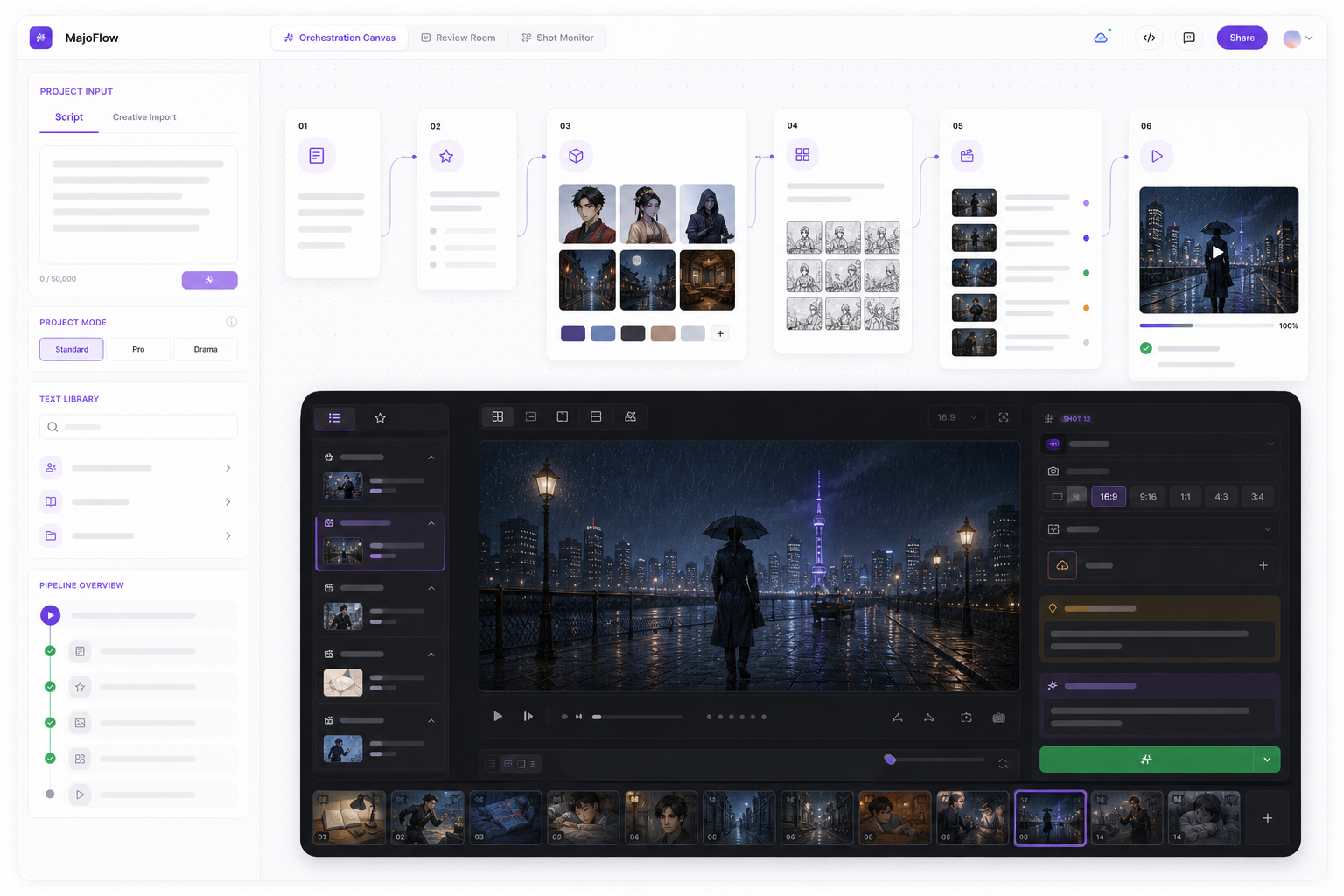
Craft at the single-shot level doesn't solve the whole-film problem. Around shot ten, the real enemy is scatter: the character reference is 40 turns deep in a chat log, the camera phrasing that worked is in another window, and nobody remembers why the last version got rejected. We organized MajoFlow's orchestration canvas as "script → assets → storyboard → shots → video → review," which is really just the craft rules above frozen into a pipeline: character sheets live in a character pack referenced by every shot, winning prompts and parameters accumulate in a shot library, and every generation records which references it used and why that version won. None of this strictly requires a tool — a rigorously maintained folder and spreadsheet will do — but someone has to do it, or shot twenty will inevitably come out worse than shot one.
FAQ
Why does the model ignore my "no X" instructions?
Most video models have no negative parameter, handle negation unreliably, and can even trigger the opposite. Rewrite negations as positive alternatives: "no shaking" → "locked-off camera"; "no clutter" → "a clean, empty background." This rule holds across every model.
Why does the second half of my 10-second shots always fall apart?
Almost certainly action overload. The real capacity of 10 seconds is two consecutive actions; anything beyond that gets randomly dropped or executed vaguely. Use a time-segmented structure (one segment for 0-3s, one for 4-8s) or split the shot.
Is a longer, more detailed prompt always better?
No. Seedance's official guide recommends staying under 500 Chinese characters (roughly 1,000 English words); past that the model grabs the highlights and drops the details. Information density beats length: every sentence should be an executable visual instruction, not an atmospheric adjective.
My character keeps changing faces between shots — what do I do?
Three things: give multi-angle references (front + profile + 45 degrees); keep the character description and label verbatim-identical across all shots, never switching to a pronoun midway; and join shots with first/last-frame mode instead of relying on the words "the same person."
Keep Reading
AI Canvas or AI Workflow — Which Do You Need?