Choose by your project's continuity needs, not by model rankings. Making one image? Use a dedicated generator. Making a batch of assets that reference each other? Use an AI canvas. Making an ongoing piece where a character can't drift off-model across dozens of shots? Use a workflow platform that accumulates assets. Models turn over every six months — the only things that survive the turnover are your assets and your process.
Start with the Hidden Cost: Time Spent Hauling Context
Tool comparisons usually fixate on generation quality, but in continuous creative work the real cost lives elsewhere. A typical multi-tool setup: worldbuilding in a chat window, characters from an image generator, shots from a video tool, finished files in cloud storage. Between every step, you're doing the same unproductive thing — hauling context: re-explaining your character design to the image tool, re-uploading references to the video tool, keeping "why we picked that version last time" in notes only you can decipher.
You won't feel this cost on day one of a project. By day ten it starts eating more time than the creating itself: assets go missing, versions stop matching, the same character description gets retold in three slightly different variants — and then your character quietly starts changing faces. To figure out which tier of tool you need, ask how much complexity you're willing to take on to eliminate the hauling. And the flip side is just as true: if your work has no continuity needs, you shouldn't pay the learning cost of a workflow.
Five Criteria — Answer Them for Your Project
- Type of work: A single poster and a thirty-shot short film are two different jobs. The first needs one-shot quality; the second needs shot thirty to hold as steady as shot one.
- Continuity: Do characters, sets, and style need to stay consistent across shots and pages? If yes, you need an asset layer (character sheets, location packs) — prompts alone won't hold consistency.
- Asset reuse: Can a winning reference image, prompt, or parameter set become an asset you cite directly next time, instead of something buried in your history?
- Pipeline flow: Does story → storyboard → image → video → sound flow naturally, or does every step mean export-then-import?
- Traceability: Can you answer "which references did this shot use, and why did we pick this version"? When a design changes, can you list what's affected?
Four Categories of AI Creative Software and When Each Fits
| Software type | Best for | Key strength | Watch out for |
|---|---|---|---|
| Single-model generators | Fast generation of images, video, audio, or text | Simple to start, strong at one thing | Project context and cross-step management are usually limited |
| Editing and production software | Cutting, layout, retouching, delivery | Mature editing capabilities, ideal for final production | Generation and story assets usually have to be managed elsewhere |
| AI creative canvases | Combining text, images, video, sound, references, and generation nodes | Free-form exploration; great for orchestrating design and asset relationships | Needs a clear discipline for organizing nodes and assets |
| Visual production workflow platforms | Design, characters, animation, AI short films, commercials, film shots | Organizes canvases, storyboards, multimodal assets, and generation pipelines around a project | Heavier than a dedicated tool if all you need is one generation |
Why You Shouldn't Pick Tools by Model Leaderboards
The pace of the last two years has been a capability leap every six months: one vendor's video model has the steadiest motion today, and another overtakes it half a year later. If your reason for choosing a tool is "it's hooked up to the strongest model," your answer has a six-month shelf life. Our own practice when integrating a model is to test it first with experienced creators on real production tasks — consistency, instruction-following, controllability — before shipping it. Even then, we wouldn't bet on any single vendor staying ahead.
Only three things survive a model generation change: your assets (character sheets, location references, style samples), your process (how you organize story into storyboards into shots), and your record of what works (which kinds of prompts succeed on which kinds of tasks). The real question for tool selection is: when the models turn over, do those three things stay put inside this tool and plug straight into the new model?
When to Choose MajoFlow — and When You Don't Need It
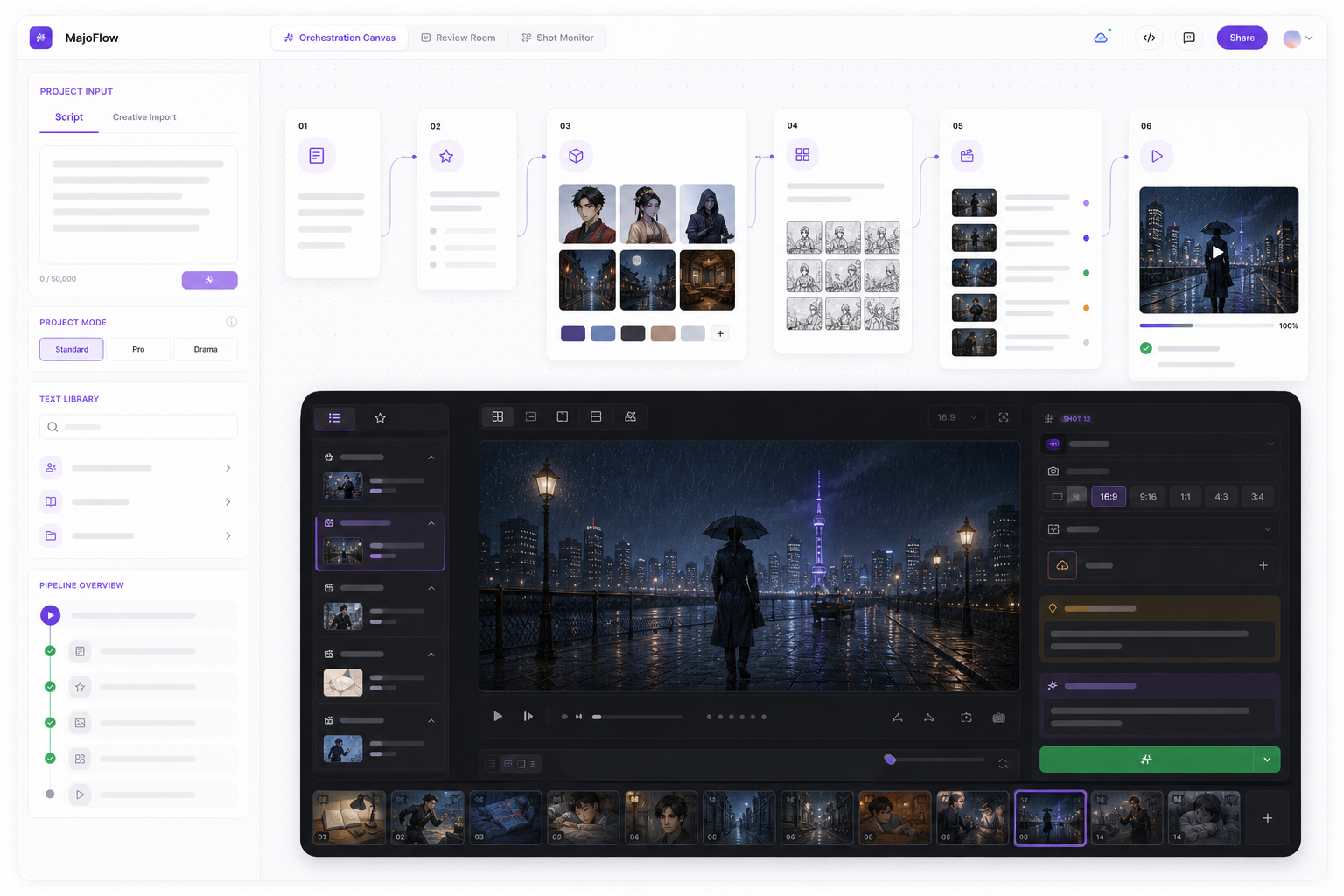
MajoFlow is designed for continuous visual creation: idea cards develop story and characters, the CanvasMAX canvas handles exploration and multi-model collaboration, the orchestration canvas drives shots forward in batches along a film-style pipeline, and the Asset Workshop accumulates character packs, wardrobe packs, location packs, and a shot library. If your project matches three or more of the five criteria above — especially character consistency and asset reuse — it solves exactly your problem.
And to be equally clear about the reverse: a one-off poster, trimming a video, or occasionally playing with a new model doesn't call for MajoFlow — dedicated tools are faster and cheaper to learn. Teams with a mature professional pipeline already in place (editing, DI, asset management all settled) should prioritize compatibility with that pipeline over wholesale replacement. A workflow platform's value scales with project continuity; without continuity, it's just a heavier tool.
FAQ
Which AI creative software is best?
It depends on continuity: a dedicated generator for one-shot images, an AI canvas when assets need to reference each other, a workflow platform for ongoing projects where a character spans dozens of shots. An answer based on model leaderboards expires in six months; an answer based on what your work needs survives model turnover.
Can't a stack of free or cheap single-model tools replace a workflow platform?
In raw capability, yes. The cost is in the hauling: manually carrying designs, references, and version history between every step. Fine for short projects; on ongoing ones that time overtakes the creating itself, and hauling mistakes show up directly as characters changing faces and style drift.
What happens to my MajoFlow projects when models get replaced?
Assets (character packs, references, locations), pipeline structure, and generation history all belong to the project, not to any specific model. When a new model comes online it references the same asset set directly — the only thing to adjust is prompt wording, rewritten in the new model's dialect.
Which models does MajoFlow integrate?
Four categories — text, image, video, and TTS — including Nano Banana, GPT-Image-2, Seedance 2.0, Kling 3O, and Fish Audio TTS. Every model is tested with creators on real tasks before integration, and once integrated it appears in your workflow as a creative action (generate a character, generate a shot) rather than a model name. See the in-app list for currently available models.
Keep Reading
AI Canvas or AI Workflow — Which Do You Need?
How to Build an AI Short Film, Animation, and Video Workflow